Behavior Video Sharing
Supplement your text ethograms with videos to help you train your behaviour observers, better.
Because sometimes, words aren't enough
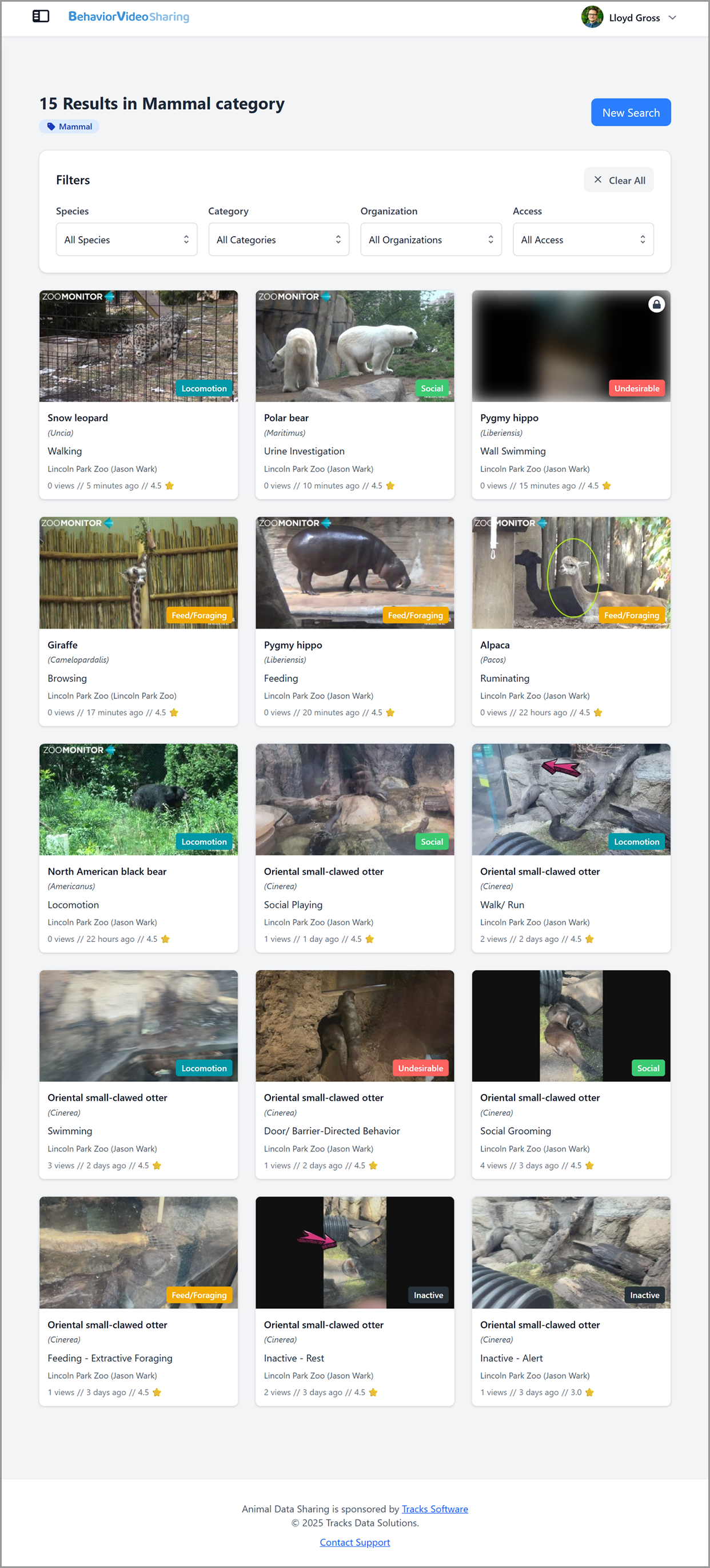
The Behavior Video Sharing site is a free platform for sharing and viewing brief video clips of animal behavior. These videos can be a valuable resource for observers to help them reliably identify different behaviors. These videos are meant to support traditional text-based ethograms that operationally define behaviors.
Although text-based definitions can provide a general description of the behavior, different individuals may display the same behavior in slightly different ways. Some behaviors may also be rare and recognizing a behavior that hasn’t been observed before from only it’s text description can be challenging. In a retrospective review at Lincoln Park Zoo, only 25% of the behaviors on their ethograms occurred during live inter-observer reliability tests (Wark et al., 2021). This leaves a significant gap in traditional testing process and highlights the need for better training materials to prepare observers.
As the saying goes, a picture is worth a thousand words (which means a video is worth a thousand words multiplied by the frame rate)! Anyone is welcome to share or access videos on the Behavior Video Sharing site. To get started, you’ll first need to sign up for Behavior Video Sharing, which is part of the broader Animal Data Sharing family of sites. After you sign up, you can start searching the database!.
Species
Videos
Contributors
Key Features
Public and Private Sharing
You can choose if you want to share videos publicly to give access to any Behavior Video Sharing user or privately to authorize access on a per-user basis.
Link Security
Each user accessing your videos gets a unique link per video. You can then manage these links, allowing you to see who and when a link was used and enabling you to deactivate any links if needed for data security.
Organizational Management
For users working within zoos, aquariums, and other organizations, you can collaboratively manage videos through organization accounts. After signing in through your personal account, you’ll be able to join your organization.
Frequently asked questions
Have a different question? Reach out to our team using the contact form and we'll get back to you as soon as we can.
How much does Behavior Video Sharing cost?
Behavior Video Sharing is free! This resource sharing website by Tracks Data Solutions is intended to support behavior observations across zoos and aquariums. If you are looking for a way to systematically record animal behavior, then you should check out ZooMonitor, another free app by the Tracks team!
What types of videos can be shared?
You can share short clips of animal behavior that are less than two minutes long. Behavior Video Sharing currently does not support longer video clips (e.g., reliability test videos).
Who owns the uploaded videos?
Ownership is based on how you share the video with Behavior Video Sharing. When uploading a new video, you can share from your personal profile, which retains ownership to you as an individual. Alternatively, if you’ve joined an organization within Behavior Video Sharing, you can share videos as that organization, which transfers ownership to that entity. Behavior Video Sharing does not assert ownership over any videos on the platform.
Can I upload multiple videos at a time?
Currently, you cannot batch upload multiple videos to Behavior Video Sharing. However, when adding new videos, you can choose to add additional videos, which will prepopulate the upload form with the information from your last video. This allows you to quickly add multiple videos while still being able to change key details like the behavior names and definitions.
Can I add videos recorded from my phone?
Yes, as long your video is in MP4 format. If you recorded the video from an iPhone, your video will be in the MOV format and need to be converted to MP4. There are many ways to do this, including using QuickTime Player on Macs or ClipChamp on Windows computers.
How can I use videos from Behavior Video Sharing?
Videos can be accessed through secure links. For training observers, you can generate a link to the video with the behavior name and definition included for the viewer. If you are testing observers or have a different name or definition, you can generate a link to the video without the name or definition.
Can I download a video?
No, videos on Behavior Video Sharing can only be accessed through links and played in your web browser. This provides greater security for your videos, allowing you to view any links to your videos. If needed, you may contact the video owners to request the original video file.
Can I use videos from Behavior Video Sharing in the ZooMonitor app?
In ZooMonitor, you can you add any links to videos from Behavior Video Sharing in Project Materials, which will allow you to view the video in the separate web browser window on your device. Currently, you cannot add video links directly to your behaviors in ZooMonitor (but we’re working on it!).
How can I collaboratively manage videos with coworkers at my organization?
Within the Behavior Video Sharing platform, you can choose to join or create an organization. As part of an organization, you and others within that organization can: 1) approve others to join your organization, 2) edit or delete any videos within your organization, 3) view stats for videos, 4) manage access to links for your videos, and 5) approve or deny access to any privately added video. In addition, videos added for your organization transfer ownership rights to the organization.
What if someone misuses my videos?
If you feel your video has been used for any purpose other than training observers (e.g., used to train AI, shared in presentations), please contact the Behavior Video Sharing support team. You can also track who has created links to your videos and deactivate them if necessary.
Are my videos being used to train AI?
No! Videos you share to Behavior Video Sharing are stored on the Mux video service. You can access their privacy policy at https://www.mux.com/privacy.